Android实训1

xiaohui_student 已于 2023-09-18 11:06:18 修改
于 2023-09-18 10:14:22 首次发布
版权声明:本文为博主原创文章,遵循 CC 4.0 BY-SA 版权协议,转载请附上原文出处链接和本声明。
实训1 动物连连看游戏界面制作
【实训名称】
动物连连看游戏界面制作
【实训效果】
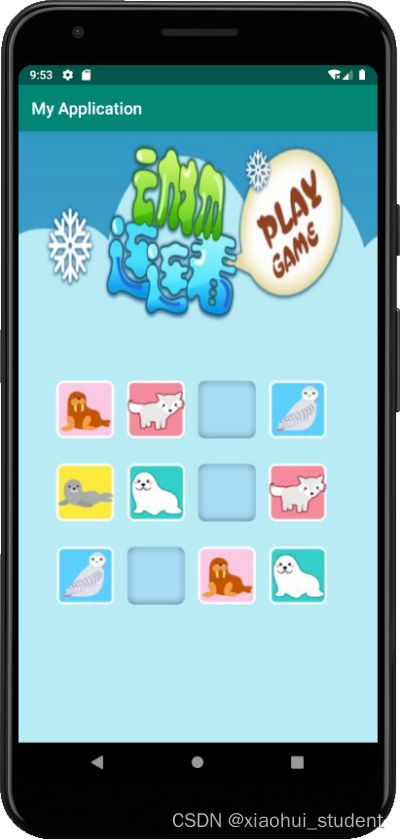
【实训目的】
掌握Android中线性布局的使用
【实训素材】
drawable-hdpi文件夹:

https://download.csdn.net/download/xiaohui_student/88351533?spm=1001.2014.3001.5503
【准备工作】
创建Android项目——Animal Application将实训素材drawable-hdpi文件夹移动至app/src/main/res目录下【知识点】
Android界面布局的通用属性:属性名称
功能描述
android:id
设置布局的标识
android:layout_width
设置布局的宽度
android: layout_height
设置布局的宽度
android:background
设置布局的背景
android:layout_margin
设置当前布局与屏幕边界或与周围控件的距离
android:padding
设置当前布局与该布局中控件的距离
(1)android:id用于设置当前布局的唯一标识。
在XML文件中它的属性值是通过“@+id/属性名称”定义。(2)android:layout_width
用于设置布局的宽度,其值可以是具体的尺寸,如50dp,也可以是系统定义的值。系统定义的值有fill_parent、match_parent和wrap_conten(3)android:layout_height
用于设置布局的高度,其值可以是具体的尺寸,如50dp,也可以是系统定义的值。系统定义的值有fill_parent、match_parent和wrap_content(4)android:background
用于设置布局背景。其值可以引用图片资源,也可以是颜色资源。(5)android:layout_margin
用于设置当前布局与屏幕边界、周围布局或控件的距离。属性值为具体的尺寸,如45dp。(6)android:padding
用于设置当前布局内控件与该布局的距离,其值可以是具体的尺寸,如45dp。2.LinearLayout(线性布局)通常指定布局内的子控件水平或者竖直排列。
在XML布局文件中定义线性布局的基本语法格式如下:
<LinearLayout
xmlns:android="http://schemas.android.com/apk/res/android"
属性 = "属性值"
......>
</LinearLayout>
3.除了布局的通用属性外,LinearLayout布局还有两个比较常用的属性,分别是android:orientation和android:layout_weight,具体介绍如下所示。
属性名称
功能描述
android:orientation
设置布局内控件的排列顺序
android:layout_weight
在布局内设置控件权重,属性值可直接写int值
属性android:orientation的值为可选值,可选值为vertical和horizontal。
(1)vertical:表示LinearLayout布局内控件依次从上到下竖直排列。
(2)horizontal:表示LinearLayout布局内控件依次从左到右水平排列。
属性android:layout_weight:
(1)该属性被称为权重,通过设置该属性值,可使布局内的控件按照权重比显示大小。
(2)在进行屏幕适配时起到关键作用。
【相关代码】
1.在app/src/main/res/values中打开styles.xml文件,并添加“连连看公共样式”部分内容:
<resources>
<!-- Base application theme. -->
<style name="AppTheme" parent="Theme.AppCompat.Light.DarkActionBar">
<!-- Customize your theme here. -->
<item name="colorPrimary">@color/colorPrimary</item>
<item name="colorPrimaryDark">@color/colorPrimaryDark</item>
<item name="colorAccent">@color/colorAccent</item>
</style>
<!-- 连连看公共样式 -->
<style name="btnStyle">
<item name="android:layout_width">70dp</item>
<item name="android:layout_height">70dp</item>
<item name="android:layout_marginRight">15dp</item>
</style>
</resources>
2.将原来的app/src/main/res/layout/activity_main.xml文件删除,创建新的布局文件,文件名为activity_main.xml。


3.在新创建的activity_main.xml文件中输入以下内容:
<?xml version="1.0" encoding="utf-8"?>
<LinearLayout xmlns:android="http://schemas.android.com/apk/res/android"
android:layout_width="match_parent"
android:layout_height="match_parent"
android:background="@drawable/animal_bg"
android:orientation="vertical"
android:paddingLeft="15dp"
android:paddingRight="15dp"
>
<LinearLayout
android:layout_width="wrap_content"
android:layout_height="wrap_content"
android:layout_gravity="center"
android:layout_marginTop="300dp"
android:orientation="horizontal">
<Button
style="@style/btnStyle"
android:background="@drawable/three">
</Button>
<Button
style="@style/btnStyle"
android:background="@drawable/four">
</Button>
<Button
style="@style/btnStyle"
android:background="@drawable/box">
</Button>
<Button
style="@style/btnStyle"
android:background="@drawable/five">
</Button>
</LinearLayout>
<LinearLayout
android:layout_width="wrap_content"
android:layout_height="wrap_content"
android:layout_gravity="center"
android:layout_marginTop="30dp"
android:orientation="horizontal">
<Button
style="@style/btnStyle"
android:background="@drawable/one">
</Button>
<Button
style="@style/btnStyle"
android:background="@drawable/two">
</Button>
<Button
style="@style/btnStyle"
android:background="@drawable/box">
</Button>
<Button
style="@style/btnStyle"
android:background="@drawable/four">
</Button>
</LinearLayout>
<LinearLayout
android:layout_width="wrap_content"
android:layout_height="wrap_content"
android:layout_gravity="center"
android:layout_marginTop="30dp"
android:orientation="horizontal">
<Button
style="@style/btnStyle"
android:background="@drawable/five">
</Button>
<Button
style="@style/btnStyle"
android:background="@drawable/box">
</Button>
<Button
style="@style/btnStyle"
android:background="@drawable/three">
</Button>
<Button
style="@style/btnStyle"
android:background="@drawable/two">
</Button>
</LinearLayout>
</LinearLayout>
相关知识
实训1宠物犬猫的品种鉴别教案
宠物寄生虫病实训
实训园(室)
创新实训(五):作品完成
犬实训心得1000字
宠物病理实训报告
猪场实训课程设计建设
实训项目与指导(宠物疾病诊治).doc
宠物实训期末总结.docx
兽医实训总结范文
原文链接: Android实训1 https://m.mcbbbk.com/newsview726040.html
| 上一篇: 宠物连连消免费版 | 下一篇: 宠物连连看精装版 |